Guides
Pay a contractor for delivered work
Add a milestone, verify the work by hand or by a merged pull request, and let the agent release the pay.
A milestone pays a contractor for a piece of work once that work is verified, instead of on an invoice's due date: five social posts delivered, a design approved, a pull request merged. You add the milestone, someone verifies the work (or GitHub does, for a pull request), and the agent decides on the release within a minute and pays it in USDC on Arc testnet. Start with a workspace that is live and has testnet USDC in its operating wallet; Go live on Arc testnet sets that up.
Owners and admins add milestones and verify them. Owners, admins and approvers decide a milestone the agent held. Other members see every milestone and its decision, but have no controls here.
Pay someone new in one step
To pay someone who is not yet on file for work they have delivered, open Contractors, open New payment, and fill in Pay a freelancer with their details, not yours: Freelancer's name, Freelancer's email if you have it, What they delivered, the Amount (USDC) and, if there is one, a Link to the work. Choose Set up payment. Vestiarion then:
- adds them as a contractor, with that amount as their payment limit, and screens them;
- adds the work as a milestone, verified by you, with the note "Delivered work confirmed when the payment was set up";
- emails them a one-time link to add the address they want to be paid at, and shows you the same link to copy. Copy link is there if they have no email or it does not arrive. The same email is where they are told once they are paid, with the transaction (see Tell the payee it was paid).
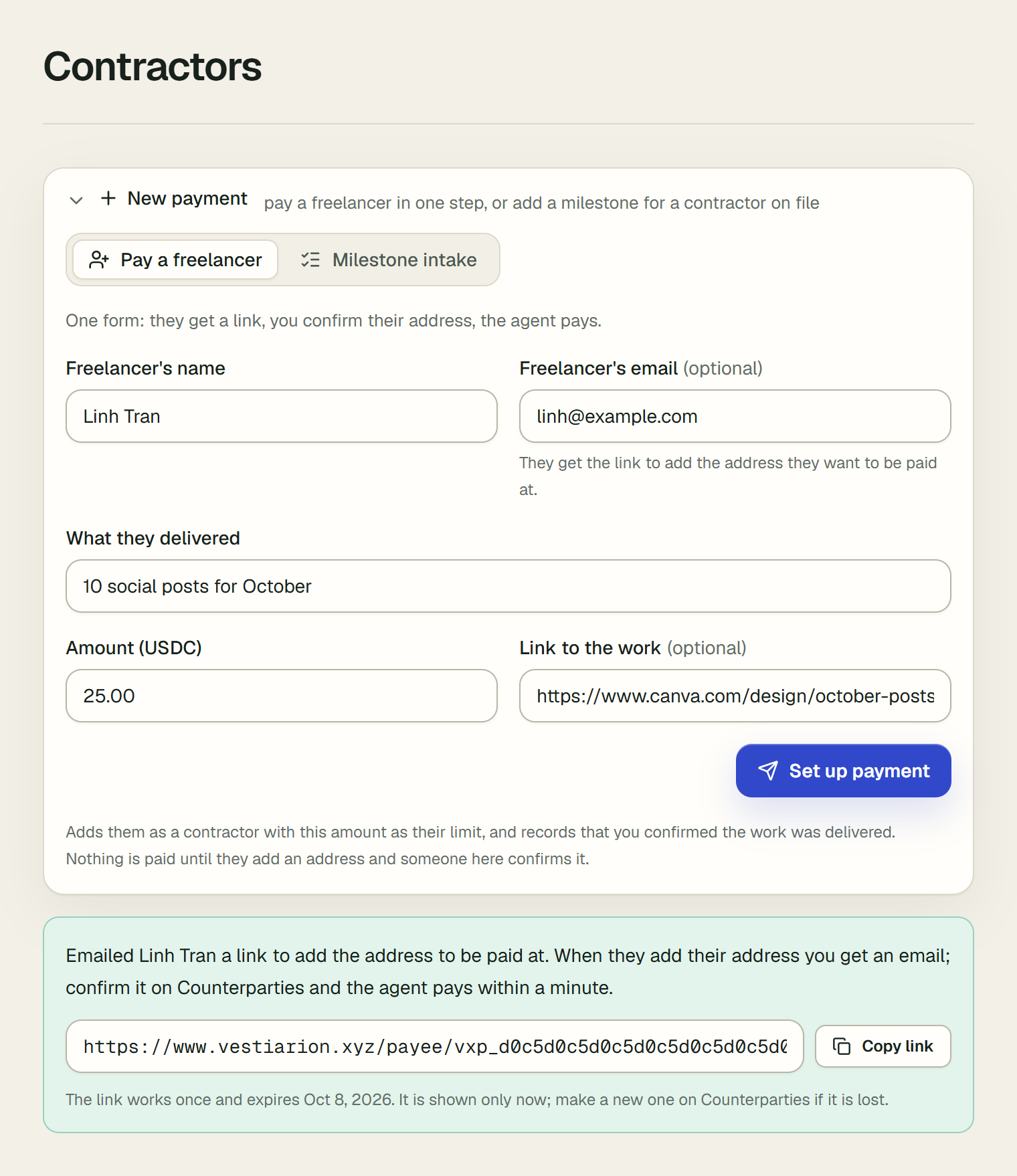
The link takes them through their side in three steps, and afterwards shows them their payment's status, up to a confirmation with the transaction: Get paid as a freelancer is the guide to send them. When they add their address, the members who can confirm addresses get an email. Confirm it on Counterparties with Confirm address, and the agent pays the milestone within a minute. Until then the milestone is listed under Needs you on Contractors, reading "Address to confirm", with a link to Counterparties; before they add an address, it reads "Waiting for an address". In a live workspace nothing is paid before that; a sandbox pays them simulated, at once. The steps below are the same path one at a time, for someone already on file.
1. Add the contractor
Open Counterparties and add the person or studio you pay, with Role set to Contractor and a Payment limit (USDC) at least as large as the milestones you will add. A vendor can be paid for milestones too; a client cannot.
The agent pays to the counterparty's Arc address. To have the contractor enter it themselves, open their row on Counterparties and choose Ask for address, then Create link, and send them the link. They need no account. Once they have entered it, choose Confirm address: until someone confirms a new address, the agent waits.
2. Add the milestone
Open Contractors, open New payment, and choose Milestone intake:
- Contractor: who is paid.
- Amount (USDC): what the work is worth.
- Work delivered: what they did, in a few words. It is the title on the milestone's card.
- Evidence link (optional): where the work can be seen. A GitHub pull request is checked for you; once your workspace connects GitHub, one in a private repository too, and the pull request gets a comment once it is paid. Any other
https://link, to a design file or a shared folder, is kept on the card for whoever verifies the work.
Choose Add milestone. The milestone starts pending, and its card says "The agent is waiting for milestone verification." Adding it is signed in the audit log as create_milestone.
3. Verify the work
On Contractors, the tiles count what needs you, what waits for verification, what is verified and being paid, and what has been paid. Under Milestones, each milestone is one row, in three groups: Needs you (held, or refused by code), In progress (waiting for verification, or verified) and Paid and closed (the latest ten; Show all lists every one). Open a row to see its card, and under it the milestone's verification and escrow.
How a milestone becomes verified depends on its evidence:
- A GitHub pull request. The form answers "The agent checks the pull request within a minute, and decides on pay once it is merged." Each cycle asks GitHub whether the pull request was merged. Once it was, the card's Verified by reads "merged PR", linked to the pull request, and the ledger records
verify_milestone_github. - Anything else. The form answers "Verify it once the work is delivered, and the agent decides on pay within a minute." When the work is in, open the milestone's row, open the work from the card's Evidence link, type what you checked into the box under the card (it reads "Evidence checked or approver note") and choose Verify manually. The ledger records
verify_milestone_manual, with your note and who you are. Revoke manually takes it back, until the milestone is paid.
4. The agent releases the pay
Within a minute of a milestone being verified, the agent decides whether to release it now, and writes its reasoning on the card: who the contractor is, their screening, and their history with the workspace. The decision is signed as milestone_release or milestone_hold.
Code checks every release the model asks for. It refuses one for a contractor screened high risk, or one above the contractor's payment limit, and the card says so. A released milestone's card links its transaction on Arc testnet.
A held milestone is decided again once something it was held for changes: the contractor's payment limit, their screening, or the milestone's evidence. Raising the limit on the counterparty brings the agent back within a minute. The ledger records milestone_reopened with what changed, followed by the new decision.
Several milestones at once
When a cycle releases two or more milestones, the agent pays them together: one transaction on Arc testnet pays every contractor. Each milestone is still decided and checked on its own, and keeps its own signed milestone_release entry.
- One transaction, all or none. The operating wallet is a Circle smart account, and the batch is one call to its own
executeBatch. The wallet sends USDC to each contractor in turn, and if any transfer fails, none happens. So the agent sends a batch only when the operating balance covers all of it. Otherwise it pays each milestone alone, as many as the balance allows. - What the card says. A milestone paid this way says it was paid in one Arc transaction with the others, for example "paid in one Arc transaction with 2 other milestones". It links the shared transaction. The ledger entry's
execution.batchholds the batch's key and size. - Fees. The transaction's fee is split equally between its milestones.
- What is never batched. A milestone locked in escrow is released on its own, as is the only milestone released in a cycle.
- If Circle's answer is lost. The milestone stays verified, and the agent looks the batch up on Circle the next cycle. It never sends the batch's payments again alone while Circle might have it. If Circle never received the batch, each milestone is then paid alone.
When a milestone is held
A held milestone is listed under Needs you, and its row says in a few words what it waits for, under its title: for example "Circle did not send it" or "Limit lowered by a screening match". Open the row. Above its card, What it waits for says it in a sentence, with a link to where it is settled.
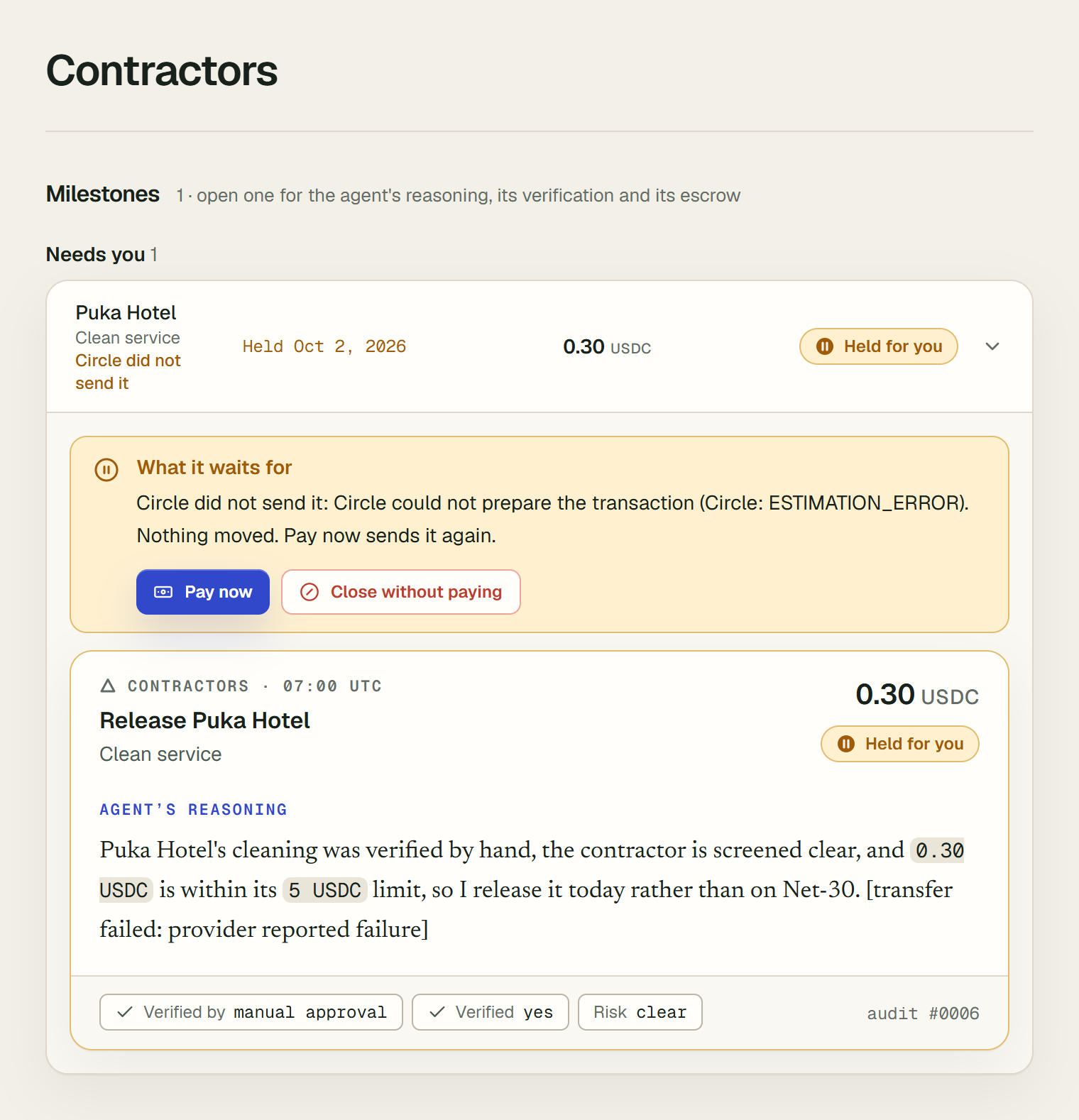
What it waits for decides what you can do:
- The contractor's screening, limit or address. For example "A screening match lowered Quoc Duong's limit to 0.25 USDC, below this milestone's 1 USDC." Settle it on Counterparties: review the match, raise the limit, or confirm the address. Once the limit or the screening changes, the agent decides the milestone again within a minute. It cannot be paid by hand before then.
- Circle did not send it. Nothing moved. Pay now sends it again, on its own, as a new attempt.
- Not screened yet. Screening could not run when the contractor was added, so the agent releases nothing to them. Screening runs again at every cycle, and once it gives a verdict the agent decides the milestone again. Pay now pays it anyway.
- The agent held it, by its own reasoning or because paying it would have taken the agent past its spending limit. Pay now overrides the hold. Someone other than whoever added the milestone must choose it: "You added this milestone, so someone else must approve paying it." If you are the only member of the workspace who can approve payments, there is nobody else to choose it, so Pay now stays enabled for you and the row says "You added this milestone. You are the only person in this workspace who can approve payments, so you can pay it yourself, and the ledger records that you did." The
milestone_approval_paidentry then ends "(entered and approved by the workspace's only approver)".
Pay now asks first, naming the amount and who is paid. It then pays the milestone as the agent would, from escrow if it is locked there. It still refuses a contractor screened high risk, a milestone above the contractor's limit, an address no one has confirmed, and an operating balance below the milestone. A transfer that may still settle is never sent twice: Pay now only records it. The audit log signs the payment as milestone_approval_paid, with who chose it.
Close without paying asks for a reason. The reason is kept on the milestone and in the audit log, signed as milestone_closed. The milestone moves to Paid and closed, marked "Closed without paying", and is never paid after: it cannot be verified again, and the agent never decides it. Closing is refused while a transfer for the milestone may still settle, and while its USDC is locked in escrow: refund the hold first.
Lock a milestone in escrow
A live workspace can lock a milestone's USDC in a contract on Arc testnet before the work starts, so the contractor can see the money is set aside for them.
-
Set it up once. On Contractors, an owner or admin opens Milestone escrow and chooses Set up escrow. Setting it up:
- creates a deployer wallet;
- sends that wallet 0.1 USDC of gas from the operating wallet;
- deploys the contract through Circle's Smart Contract Platform.
If it is interrupted, choose Finish setting up: nothing is deployed twice.
-
Lock a milestone. Open the row of a milestone that is not verified yet; under its card, set Refundable to this workspace from and choose Lock in escrow.
- The contractor needs a confirmed Arc testnet address. The form names the address the hold will pay; that address cannot change afterwards.
- The card then reads, for example, "2 USDC locked in escrow for 0x67C8…0504 until 31 Oct 2026", with the transaction that funded it.
-
What the contract allows. Only the workspace's operating wallet can call it, and only two things can happen to a hold, once:
- it is released to the contractor's address;
- from the refund date, it is refunded to the workspace.
Before that date, the money can go nowhere but to the contractor.
-
Release. Once the milestone is verified, the agent pays it by releasing the hold instead of sending a transfer. It holds the milestone for a person instead when:
- its amount changed after it was locked;
- the contractor's address is no longer the one the hold pays. Refund it from its date, then pay the new address.
-
Refund. From the refund date, a hold that is still on chain shows Refund from escrow.
The contract was written for Vestiarion and is not audited. Its source, its functions and the address it runs at in production are on Contracts on Arc testnet.
5. Read it in the audit log
Open Audit log to see the milestone's whole story in order, each entry signed: create_milestone when it was added, the verification, and the agent's release decision with its reasoning and its transaction. Verify an audit export shows how someone outside the workspace can check the same entries.