Guides
Get paid as a freelancer
For the person being paid: add your wallet address through the link a business sent, follow each step, and check the payment on Arc testnet.
This guide is for the person being paid. A business that uses Vestiarion can pay you in USDC on Arc testnet for work you delivered. You need no account. You need two things: the link the business sent you, and a wallet address. The page behind the link takes you through three steps and tells you which one you are on: Your address, Confirmation and Payment.
What you need
- The link. It comes in an email titled "Business wants to pay you amount USDC", with an Add my address button. A business can also send you the link itself; it starts with
https://www.vestiarion.xyz/payee/. - A wallet you control that can hold USDC on Arc testnet, such as MetaMask. Its address starts with
0xand has 42 characters. Your address on Arc testnet is the same as your Ethereum address in that wallet. - Nothing else. No account, no fee, no password. Vestiarion only needs your address. It never asks for your recovery phrase or private key. If anyone asks you for those, stop.
To see Arc testnet in MetaMask, add it as a network:
| Field | Value |
|---|---|
| Network name | Arc Testnet |
| RPC URL | https://rpc.testnet.arc.network |
| Chain ID | 5042002 |
| Currency symbol | USDC |
| Block explorer | https://explorer.testnet.arc.io |
1. Add your address
Open the link. The page says who wants to pay you, how much, and for what. Under it are the three steps in a line each.
Copy your address from your wallet's receive screen rather than typing it. Paste it into Your wallet address on Arc testnet and choose Continue. If the business pays you on another chain, the field names that chain instead, such as Base Sepolia.
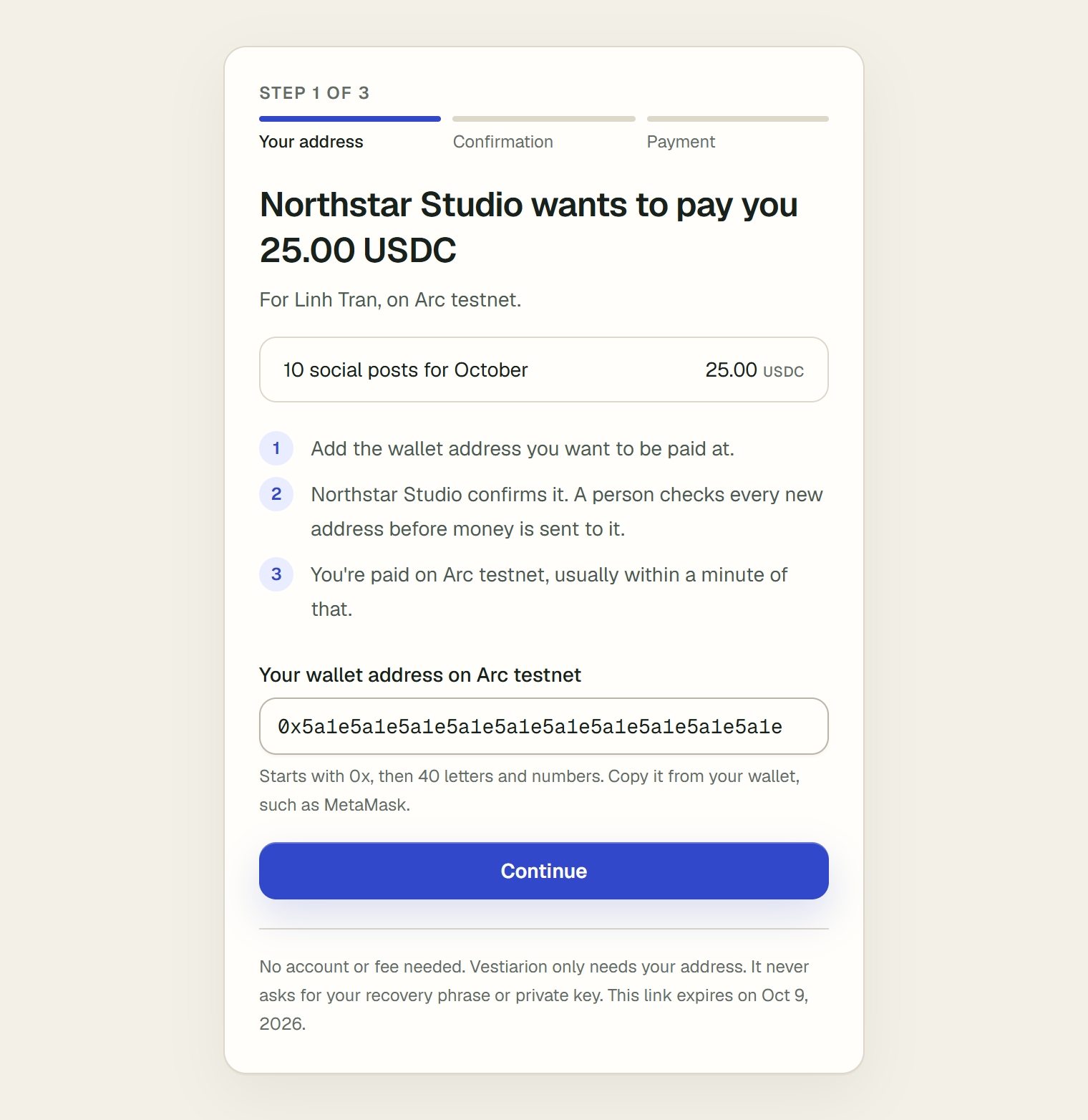
If what you pasted is not an address, the page says "That doesn't look like a wallet address. It starts with 0x and has 42 characters in all." Copy it again, in full.
2. Check it, then send it
The next screen, Check your address, shows the address back in groups of four characters, with the first and last groups in bold. Compare them with your wallet. Then tick all three boxes under Before you send it, tick all three:
- "It's my own wallet, and I can open it."
- "It's not an exchange deposit address."
- "The first and last characters match my wallet."
It is a checklist, not a choice: Send my address works once all three are ticked, and until then the page says "Tick all three boxes to send your address." Edit address takes you back to change it.
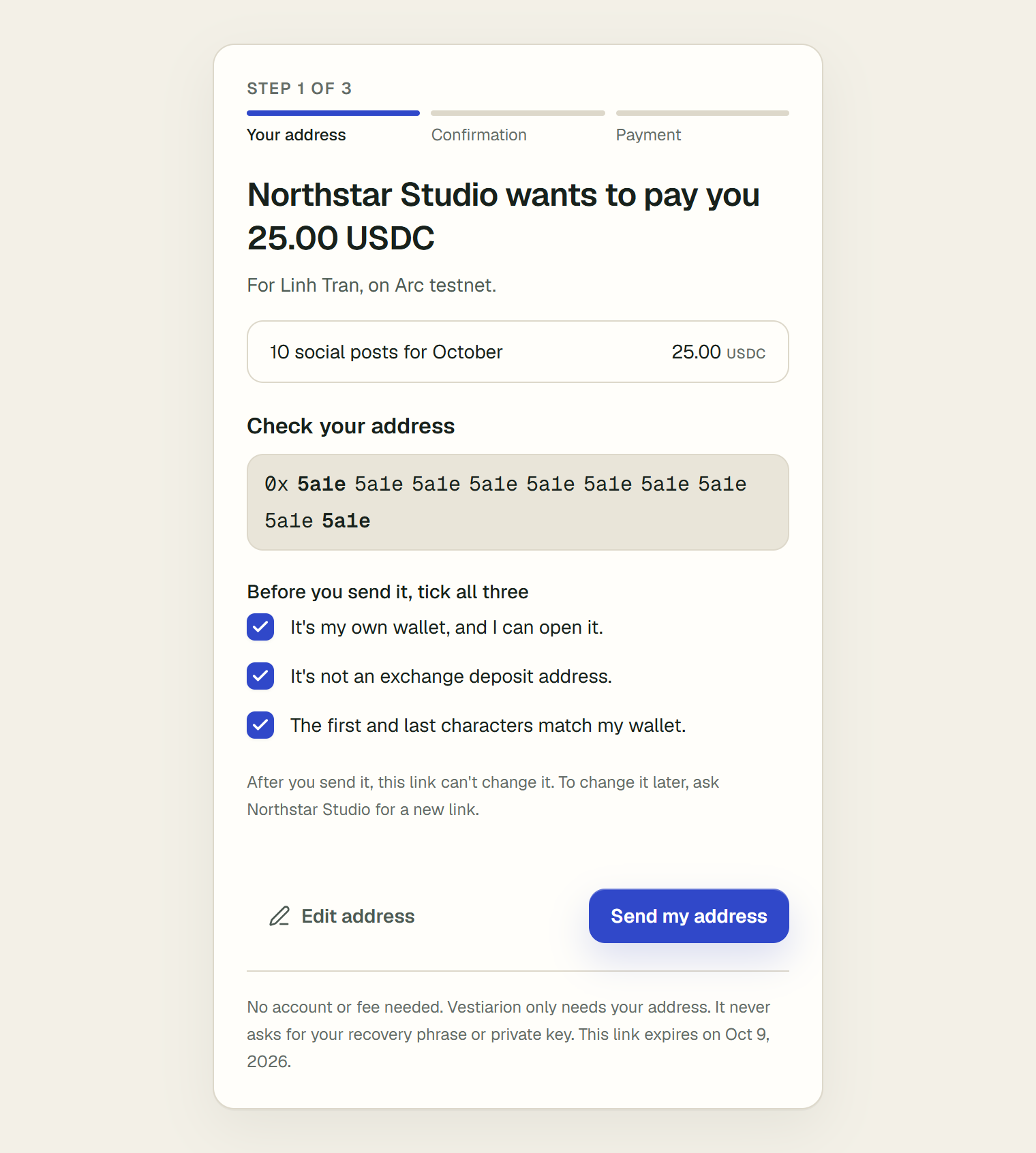
After you send it, the link cannot change the address. If you notice a mistake, tell the business at once and ask for a new link: they confirm every new address before paying, so a wrong one can still be replaced before any money moves.
3. Wait for the business to confirm
The same link now shows Step 2: "Address sent", and that the business confirms it next. It shows your address shortened to its first and last characters.
A person at the business checks every new address before any money is sent to it. This protects you as much as them: someone who got hold of your link could not redirect your payment. The business gets an email when your address arrives.
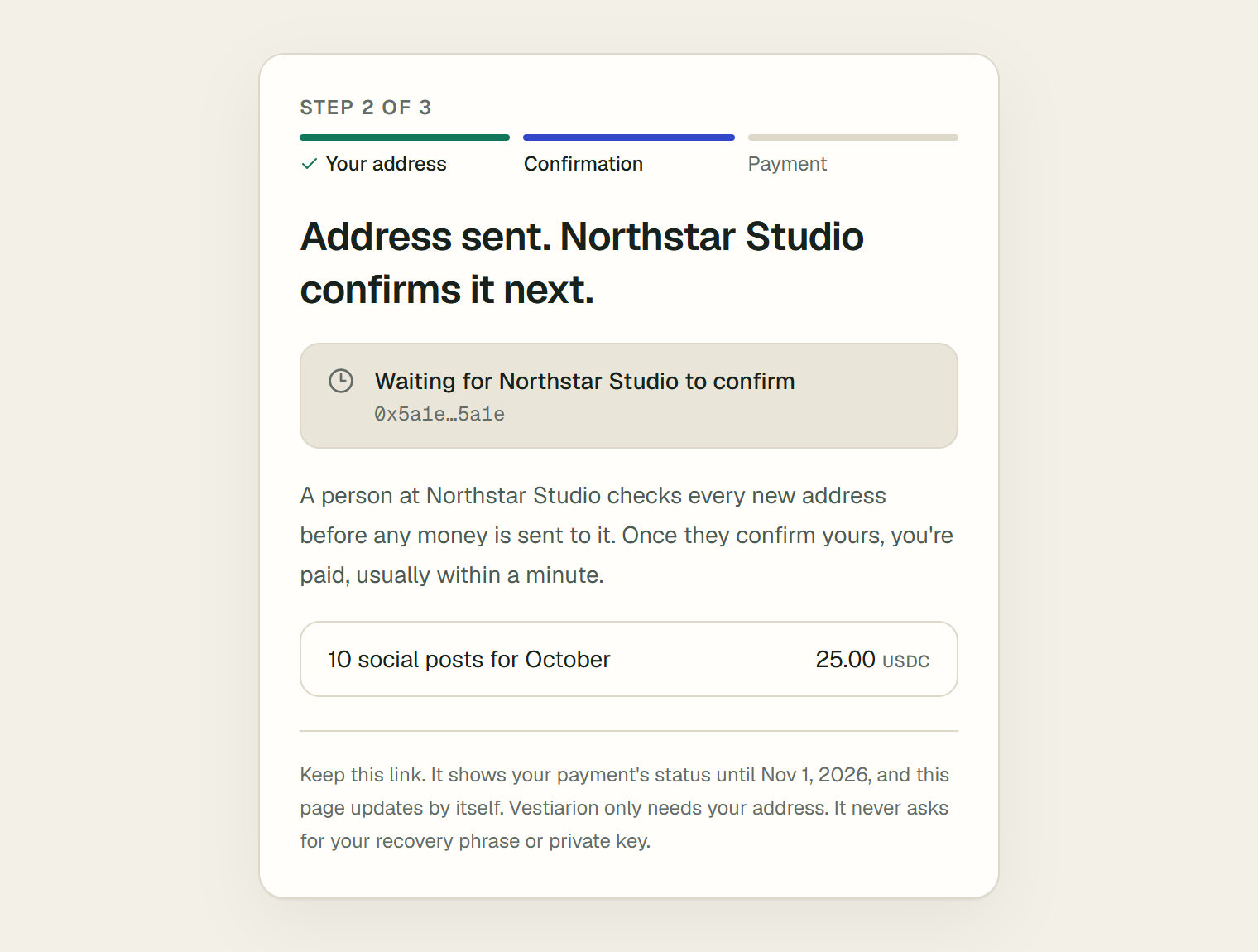
Keep the link. It keeps showing your payment's status for 30 days after you sent your address. You do not need to reload it: while it waits on someone else, the page updates by itself every 30 seconds.
4. Get paid
Once the business confirms your address, the page shows Step 3, Your address is confirmed, with each payment and its status. Their agent pays a confirmed payment usually within a minute.
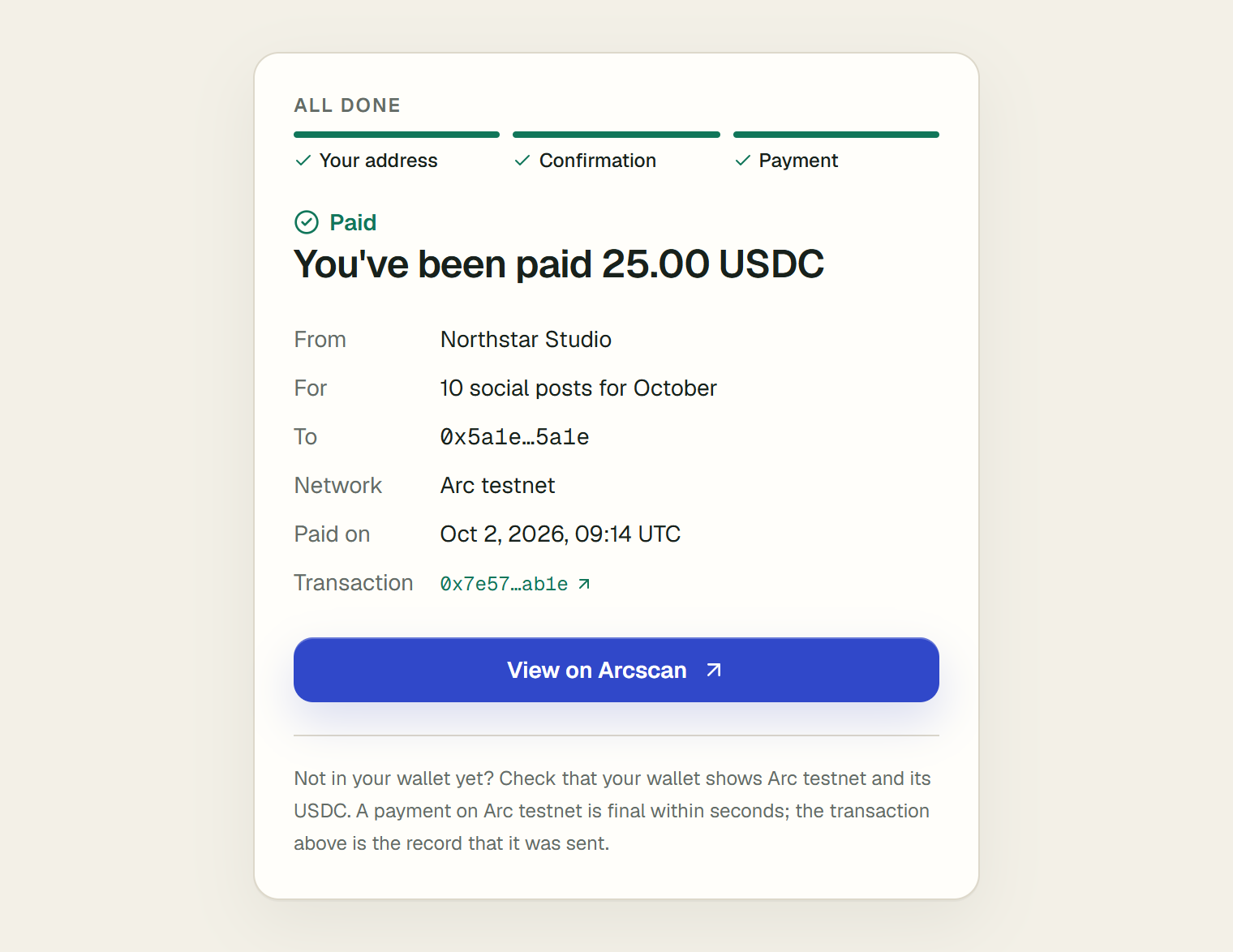
When every payment is sent, the page becomes your confirmation: "You've been paid", with the amount, and below it who paid you, for what, the address it went to, the network, when it was paid, and the transaction. View on Arcscan opens the transaction on Arc testnet's explorer, where anyone can check it.
If the business has your email, you are also told by email, from no-reply@vestiarion.xyz, once the payment is confirmed: "Business paid you amount", what for, the address and the time, and View the transaction. For anything about the payment itself, contact the business.
What each status means
| On the page | What it means | What you do |
|---|---|---|
| Waiting for business to confirm | Your address arrived; a person has not confirmed it yet. | Nothing. If it has been a day, remind the business. |
| Waiting for business to approve the work | The business has not marked the work as delivered yet. | Nothing, or ask the business. |
| Being prepared | Everything is ready; the agent pays within about a minute. | Nothing. |
| Scheduled for date | The business pays on that day, as its terms say. | Nothing. |
| With business for review | A person at the business looks at the payment before it is sent. The page never says why. | Nothing. Ask the business if you have questions. |
| On its way | The transfer was sent and is being confirmed on chain. | Wait a moment. |
| Paid | The money was sent to your address. | Check your wallet, or the transaction on Arcscan. |
Words you will see
- USDC: a stablecoin issued by Circle, meant to be worth one US dollar.
- Arc testnet: the test network of Arc, Circle's blockchain for stablecoin payments. Payments there settle in seconds.
- Wallet address: where money is sent to you,
0xand 40 letters and numbers. Sharing it is safe; it lets people pay you, not take from you. - Recovery phrase and private key: what opens your wallet. Never share them, with Vestiarion or anyone else.
- Transaction: one transfer on the blockchain, with an id (its hash) that starts with
0x. - Arcscan: Arc testnet's public explorer, where anyone can look a transaction up by its hash.
- Confirm: the business checking that an address really is yours before it pays to it.
Fees and timing
- Fees. You pay nothing. The business pays the network fee, which on Arc is less than a cent, in USDC. If you are paid on another chain, the business pays the transfer fee too.
- Confirmation. It depends on the business: a person has to do it.
- Payment. After confirmation, the agent pays within about a minute, and a payment on Arc testnet is final within seconds.
- Another chain. If you are paid on Base Sepolia, Arbitrum Sepolia or Ethereum Sepolia, the money is sent from Arc testnet. It arrives on your chain a few minutes later. The transaction on Arcscan is the sending side.
Before you send your address
- I copied it from my wallet's receive screen, not typed it.
- It is my own wallet, which I can open, not an exchange deposit address.
- It is for the network the page names, usually Arc testnet.
- Its first and last characters match my wallet.
- Nobody asked me for my recovery phrase or private key.
If something goes wrong
| What you see | Why | What to do |
|---|---|---|
| That doesn't look like a wallet address. It starts with 0x and has 42 characters in all. | What you pasted is not an address, or it was cut short. | Copy the whole address again from your wallet. |
| This link is no longer valid. Ask the business that sent it for a new one. | The link expired before you used it, the business made a newer one, or it is more than 30 days since you used it. | Ask the business for a new link. |
| That is already the address business has on file. | The business already had this address. | Nothing; it is confirmed the usual way. |
| That did not work. Try again in a moment. | Something failed on the way; your address was not saved. | Try again. If it keeps happening, tell the business. |
| This page could not load. Try again in a moment. | The page could not read the link's status. | Reload in a minute. |
| Stuck on Waiting for business to confirm | Nobody at the business has confirmed it yet. | Ask them to confirm it on their Counterparties page. |
| Paid, but nothing in your wallet | The wallet is not showing Arc testnet, or not its USDC. | Add Arc testnet with the table above, then check again. The transaction on Arcscan shows where it went. |
| You sent a wrong address | The link cannot change it. | Tell the business before they confirm, and ask for a new link. A payment already sent cannot be reversed. |
After you are paid
The confirmation stays on the link for 30 days after you sent your address. To keep a record for longer, keep the transaction link: it stays on Arcscan. If the business pays you again later, it sends a new link, or pays the address it already has.